Understanding the Hidden Wiki's Dark Web Secrets
The internet as we know it is vast, but the websites you access daily through traditional search engines represent only a tiny fraction of the digital universe. Beneath the surface lies a complex, encrypted ecosystem that has fascinated cybersecurity experts, privacy advocates, and curious netizens for years. Understanding the Hidden Wiki's Dark Web Secrets is the first step for anyone looking to navigate this obscured digital landscape safely and responsibly.
For years, the dark web has been shrouded in mystery, often depicted by mainstream media as a lawless wasteland. While it is true that illicit activities occur in its hidden corners, the darknet is also a vital sanctuary for journalists, whistleblowers, and citizens living under oppressive regimes. At the heart of this hidden internet lies the Hidden Wiki—a foundational directory that has historically served as the gateway for newcomers.
In this comprehensive guide, we will dismantle the myths, explain the underlying technologies, and provide actionable advice on how to explore this encrypted space securely.
The Digital Iceberg: Dark Web vs Deep Web Differences Explained
Before diving into the mechanics of anonymous browsing, it is crucial to establish the terminology. The terms "deep web" and "dark web" are frequently used interchangeably by the media, but they refer to completely different digital environments. Understanding the dark web vs deep web differences explained here will clarify exactly what part of the internet you are preparing to access.
The Surface Web
The Surface Web is the visible web. It consists of all the webpages indexed by standard search engines like Google, Bing, and Yahoo. When you read a news article, scroll through public social media feeds, or shop on a major retail site, you are on the surface web. Despite feeling infinite, cybersecurity experts estimate that the surface web makes up roughly 4% to 10% of the entire World Wide Web.
The Deep Web
Beneath the surface lies the Deep Web, which accounts for the vast majority of the internet (roughly 90% or more). The deep web consists of any webpage that is not indexed by standard search engines. There is nothing inherently malicious about the deep web; in fact, you use it every day. Examples include:
- Your private email inbox
- Online banking portals
- Corporate databases and intranets
- Academic journals hidden behind paywalls
- Medical records and legal documents
- Streaming video content behind subscription logins
These pages are hidden behind security protocols, passwords, or CAPTCHAs, preventing web crawlers from indexing them.
The Dark Web
The Dark Web is a small, highly encrypted subset of the deep web. It operates on isolated networks (darknets) that require specific, specialized software to access. The websites hosted here use heavy encryption to mask the IP addresses and physical locations of both the server hosting the site and the user visiting it. This is where you will find the hidden wiki dark web directories, uncensored forums, and anonymous marketplaces.
The Engine of Anonymity: Onion Routing Protocol and Privacy Layers
To access the dark web, you cannot simply use Google Chrome or Safari. The darknet relies on specialized networks, the most prominent being the Tor (The Onion Router) network. Originally developed in the mid-1990s by the United States Naval Research Laboratory to protect U.S. intelligence communications online, Tor was eventually released to the public as open-source software.
How Onion Routing Works
The architecture of the darknet is built on the onion routing protocol and privacy layers. When you send a request over the traditional internet, your data travels in a relatively straight line from your computer to the website's server. Your IP address (your digital physical address) is visible throughout this journey.
Tor completely disrupts this direct connection. When you use Tor, your internet traffic is bundled in layers of encryption—like an onion. Here is how your data travels:
- The Entry Node (Guard Node): Your encrypted data enters the Tor network here. The Entry Node knows your IP address, but it cannot see the actual data you are sending or your final destination.
- The Middle Relay: The data is passed to a randomly selected server anywhere in the world. The Middle Relay removes a layer of encryption. It only knows the IP address of the Entry Node and the next node in the chain. It does not know who you are or what site you are visiting.
- The Exit Node: The final layer of encryption is peeled away. The Exit Node knows what website you are trying to visit, but it has no idea who originated the request. The data is then sent to the destination website.
The Anonymity Benefits of Tor Network Encryption
The anonymity benefits of tor network encryption are profound. Because no single node in the network knows both the origin and the destination of the web traffic, it becomes nearly impossible for an eavesdropper—whether that is your Internet Service Provider (ISP), a hacker on a public Wi-Fi network, or a government surveillance agency—to trace your online activity back to your physical location.
This powerful encryption is what enables true anonymous browsing. It protects freedom of speech, shields users from corporate tracking, and allows marginalized voices to communicate without fear of retribution.
Decoding the Gateway: What is The Hidden Wiki?
When a user successfully connects to the Tor network for the first time, they are faced with a stark reality: there is no central Google-like search engine that reliably indexes the entire dark web. Furthermore, dark web URLs do not look like standard web addresses. Instead of "example.com," an onion URL is a long, complex string of random letters and numbers ending in the .onion suffix (e.g., expyuz5tat...onion).
Because these URLs are impossible to memorize and change frequently, early darknet pioneers created directories. The most famous of these is the Hidden Wiki.
The Original Hidden Wiki
The Hidden Wiki started as a community-edited directory, functioning much like Wikipedia or the early Yahoo Directory. It categorized links to various hidden services, organizing them into logical sections such as:
- Financial services and cryptocurrency tumblers
- Secure email providers (like ProtonMail's onion mirror)
- Anonymous messaging and chat forums
- Whistleblower submission portals
- E-commerce platforms and marketplaces
For years, it served as the unofficial homepage of the dark web. It provided new users with a curated list of active links, making the chaotic and decentralized darknet somewhat navigable.
Official Hidden Wiki vs Mirrors and Clones
Today, understanding the landscape requires distinguishing between the official hidden wiki vs mirrors and clones. The original Hidden Wiki has been taken down, hacked, and relocated multiple times over the years. Because the platform was open-source and easy to copy, thousands of clones and mirrors sprouted across the darknet.
This proliferation creates a significant security challenge. While some mirrors are maintained by well-intentioned privacy advocates trying to keep the directory alive, others are malicious. Cybercriminals frequently create identical-looking Hidden Wiki clones, but they swap out the legitimate links with phishing URLs. If a user clicks a marketplace link on a fake Wiki, they may be directed to a clone of the marketplace designed solely to steal their login credentials and cryptocurrency.
Hidden Wiki Onion Site and Directory Links
Despite the risks, finding reliable hidden wiki onion site directory links remains a common starting point for researchers and privacy enthusiasts. A legitimate directory acts as a map of the underground internet. It allows users to quickly locate secure communication tools, open-source software repositories, and alternative news outlets. However, the golden rule of the dark web is "trust, but verify." You must always cross-reference the links you find on any Wiki against secondary trusted sources before logging into any service or transferring funds.
For further investigation,Torzle's onion site directory offers a curated starting point for discovering hidden web resources and privacy-focused tools.
Preparation and Setup: Entering the Shadows
Exploring the darknet should never be done on a whim. The lack of central regulation means that the safety nets present on the surface web—like automated malware scanning and SSL certificate verification—are either absent or function differently. Knowing how to access the dark web safely for beginners is critical to protecting your digital identity and hardware.
Downloading the Tor Browser for Dark Web Navigation
Your primary tool for this journey is the Tor Browser. Built on a modified version of Mozilla Firefox, the Tor browser for dark web navigation is specifically engineered to route your traffic through the Tor network while blocking browser fingerprinting and intrusive trackers.
Actionable Steps to Get Tor:
- Only Use Official Sources: Never download the Tor Browser from a third-party software site. Always download it directly from the official Tor Project website (torproject.org).
- Install the Browser: The installation process is as simple as installing any standard web browser. It is available for Windows, macOS, Linux, and Android.
- Understand the Limitations: Do not use the Tor Browser for your daily surface web activities like logging into your personal Facebook account or online banking. Logging into accounts tied to your real identity while on Tor completely defeats the purpose of anonymous browsing.
Secure VPN and Tor Configuration Tips
While Tor provides excellent anonymity, your ISP can still see that you are connecting to the Tor network, even if they cannot see what you are doing on it. In some countries, merely using Tor can raise red flags. Therefore, combining Tor with a Virtual Private Network (VPN) is a highly recommended security practice.
VPN Over Tor vs. Tor Over VPN:
- Tor over VPN (Recommended for most): You connect to your VPN first, and then open the Tor Browser. This hides the fact that you are using Tor from your ISP. Your ISP only sees encrypted VPN traffic. The VPN provider sees that you are connecting to Tor, but cannot see your destination traffic.
- VPN over Tor: This is highly complex to configure and generally not recommended for beginners, as it can inadvertently compromise your anonymity if not set up flawlessly.
Essential Configuration Tips:
- Use a strict No-Logs VPN: Ensure your VPN provider has a proven, audited zero-logs policy.
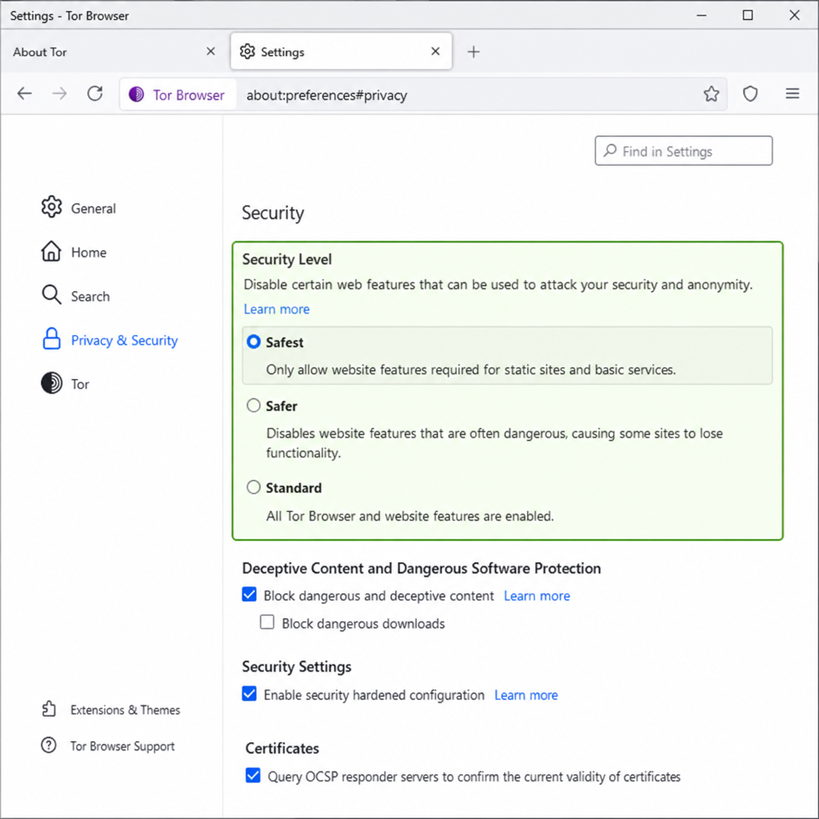
- Adjust Tor Security Settings: Click the shield icon in the top right corner of the Tor Browser. Change the security level from "Standard" to "Safer" or "Safest."
- Safer: Disables website features that are often dangerous, such as JavaScript on non-HTTPS sites.
- Safest: Disables JavaScript entirely. While this may break the layout of some websites, it neutralizes the vast majority of browser-based exploits and malicious scripts.
- Do Not Maximize the Window: The Tor Browser will warn you against maximizing the browser window. Websites can determine your monitor's size and resolution, which can be used to create a unique "fingerprint" of your device.
Navigating the Darknet: A Guided Tour
Once your security perimeter is established, it is time to connect. Navigating the dark web is a vastly different experience from browsing the surface web. Speeds are significantly slower because your traffic is bouncing across the globe through multiple relays. Websites frequently go offline without warning due to server instability or security relocations.
Step-by-Step Guide to Browsing Onion Websites
Here is a secure step-by-step guide to browsing onion websites for the first-time user:
- Activate your VPN: Ensure your connection is secure and your kill-switch is active.
- Launch Tor: Open the Tor Browser and click "Connect" to establish a circuit to the Tor network.
- Set the Security Level: Click the shield icon and select "Safer" or "Safest."
- Find a Starting Point: Enter a known, reliable dark web URL into the address bar. If you do not have a trusted Hidden Wiki link, use a darknet search engine (more on this below).
- Browse Patiently: Understand that pages may take 10 to 30 seconds to load. Do not rapidly click links or refresh pages, as this can strain the network.
- Maintain Operational Security (OpSec): Do not download files, especially PDFs or Word documents. These files can contain embedded scripts that "call home" to the surface web, exposing your real IP address outside of the Tor network.
Best Darknet Search Engines vs Directory Lists
Because onion directories like the Hidden Wiki can be plagued by dead links and phishing clones, users often turn to search engines specifically designed for the darknet. Understanding the dynamic between the best darknet search engines vs directory lists will drastically improve your navigation experience.
Directory Lists (The Hidden Wiki, TorLinks):
- Pros: Human-curated, categorized logically, great for discovering the types of services available.
- Cons: Frequently outdated, high risk of encountering malicious mirrors.
Darknet Search Engines (Ahmia, Torch, DuckDuckGo Onion):
- Pros: Indexes active .onion sites, allows for specific keyword searches, filters out known child abuse materials (in the case of Ahmia and DuckDuckGo).
- Cons: Search results can be messy; SEO does not exist on the dark web, so finding high-quality, relevant results requires sifting through spam.
Tip: DuckDuckGo is the default search engine on the Tor Browser. While it excels at anonymous surface web searches, to search for .onion links specifically, you are better off using Ahmia or Torch.
What Lies Beneath: Exploring the Content
The allure of understanding the Hidden Wiki's dark web secrets lies in the content itself. The dark web is a reflection of human nature without the constraints of societal regulation. It hosts a paradoxical mix of extreme criminality and profound freedom.
Finding Uncensored Information on the Darknet
For many, the dark web is a vital lifeline to the outside world. Finding uncensored information on the darknet is a primary use case for millions of users globally.
In countries with authoritarian regimes that strictly censor the internet and monitor citizen activity, the Tor network provides a way to read independent news, access blocked social media platforms, and organize democratic protests. Major global entities recognize this necessity and host official .onion versions of their websites:
- News Organizations: The BBC, The New York Times, and ProPublica all operate official dark web mirrors. This ensures that readers in heavily censored regions can access accurate, unbiased news anonymously.
- Whistleblowing Platforms: SecureDrop is an open-source whistleblower submission system managed by the Freedom of the Press Foundation. It is widely used by major media outlets to allow anonymous sources to submit sensitive documents (like evidence of corporate corruption or government overreach) without fear of being tracked.
- Privacy-Focused Tech: Platforms like Facebook and Twitter have maintained onion sites to allow users in restricted countries to bypass national firewalls and communicate freely.
Darknet Marketplaces and Forums Overview
We cannot discuss the dark web without addressing the underground economy. A darknet marketplaces and forums overview reveals a sophisticated, multi-billion-dollar digital underworld.
The Forums: Darknet forums are the social hubs of the underground. While some forums are dedicated to mundane topics like privacy software development or libertarian philosophy, others are dedicated to illicit trades. Here, you will find communities discussing hacking tutorials, sharing leaked corporate databases, and debating the merits of various privacy coins like Monero. These forums often serve as the vetting ground where users build "reputation" before engaging in marketplace transactions.
The Marketplaces: Following the blueprint laid out by the infamous Silk Road (which was shut down by the FBI in 2013), modern darknet markets operate much like Amazon or eBay, but for illicit goods. They feature user reviews, vendor ratings, escrow systems, and customer dispute resolution. Common items sold include:
- Narcotics and pharmaceuticals
- Stolen credit card data (carding)
- Forged documents (passports, driver's licenses)
- Malware and ransomware-as-a-service (RaaS)
Note: Purchasing illicit goods on the dark web is highly illegal and incredibly risky. Law enforcement agencies globally constantly monitor these platforms, frequently seizing the servers and arresting both vendors and buyers.
The Perils of the Deep: Security Threats and OpSec
Exploring the dark web is akin to walking through a rough neighborhood at night. If you mind your own business and know where you are going, you are generally safe. If you wander blindly and trust strangers, you will likely become a victim. Avoiding darknet scams and malicious links is paramount for any explorer.
The Risks of Clicking Unverified Onion Links
Because the dark web lacks regulatory oversight, cybercriminals operate with impunity. The risks of clicking unverified onion links are severe and multifaceted.
- Phishing and Credential Theft: As mentioned in the Hidden Wiki section, the most common threat is phishing. Scammers clone popular forums and marketplaces. When you enter your username and password, the scammer harvests them. If you use the same credentials elsewhere, your digital life can be compromised.
- Malware and Ransomware: Visiting an unverified link with JavaScript enabled can expose your device to drive-by downloads. Malicious scripts can automatically install ransomware on your computer, encrypting your files and demanding cryptocurrency for their release.
- Honeypots: Law enforcement agencies frequently seize illicit dark web sites and keep them running as "honeypots." They monitor the traffic entering the site to identify and track users engaging in illegal activities.
- Exit Scams: This is unique to darknet markets. When a market administrator decides to close up shop, rather than shutting down gracefully, they will disable the withdrawal function. Users continue to deposit cryptocurrency to make purchases, and the administrators run off with millions of dollars in escrowed funds.
Mastering Operational Security (OpSec)
To mitigate these risks, users must practice rigorous Operational Security. OpSec is a military term adopted by the cybersecurity community that refers to the process of identifying and protecting critical information that could be used by adversaries.
Key OpSec Rules for the Dark Web
- Never use your real name, email, or social media handles. Create entirely new, unconnected pseudonyms for any dark web interaction.
- Never reuse passwords. Use an offline password manager to generate complex, unique passwords for every site.
- Tape over your webcam and mute your microphone. While rare, sophisticated malware designed to hijack hardware peripherals does exist.
- Do not buy anything. Unless you are a highly advanced user who understands PGP encryption, cryptocurrency tumbling, and secure drop-shipping, attempting to make a purchase will almost certainly result in being scammed or compromised.
- Trust No One. The anonymous nature of the darknet means that everyone is a potential threat. A friendly user offering a link to an "exclusive" forum is likely baiting you into a phishing trap.
The Legal Landscape and Ethics of the Dark Web
A common question among those curious about this digital frontier is: Is the Hidden Wiki legal to use? The answer requires nuance, as legality often depends on your physical jurisdiction and your actions while connected.
Browsing vs. Participating
In the United States, the European Union, and most democratic nations, downloading the Tor Browser and accessing the dark web is entirely legal. The Tor network itself is a neutral technology—a tool for privacy. Visiting directories like the Hidden Wiki or reading discussions on a darknet forum does not constitute a crime.
However, the veil of anonymity does not grant immunity from the law. The moment you step from browsing into participating in illegal activities, you have crossed a legal line. Actions that are strictly illegal include:
- Purchasing or selling illicit narcotics.
- Buying stolen financial data or forged documents.
- Accessing, downloading, or distributing child sexual abuse material (CSAM).
- Hiring illegal services (though it should be noted that the infamous "dark web hitman" sites are universally considered to be scams or law enforcement honeypots).
The Ethical Dilemma
The existence of the dark web presents a profound ethical dilemma. On one hand, it facilitates severe criminal enterprises, allowing syndicates to operate beyond the reach of traditional law enforcement. The anonymity benefits of Tor network encryption are utilized by ransomware gangs to extort hospitals and infrastructure providers.
On the other hand, the exact same encryption protects the lives of dissidents in totalitarian regimes. Without the dark web, journalists in heavily censored countries would have no way to communicate with outside media. Whistleblowers would have no safe avenue to expose corporate fraud. For many, the darknet is the last true bastion of unadulterated free speech on the internet.
When you explore the dark web, you are stepping into this complex moral gray area. It is a space defined equally by its capacity for harm and its necessity for human rights.
Advanced Protection: Moving Beyond the Basics
For those who wish to elevate their understanding of the Hidden Wiki's dark web secrets and transition from a beginner to an advanced user, standard VPN and Tor Browser configurations are just the starting point. Advanced users leverage dedicated operating systems designed from the ground up for amnesic, anonymous browsing.
Tails OS: The Amnesic Incognito Live System
If you want to ensure that your dark web activities leave absolutely zero trace on your physical computer, Tails OS is the gold standard. Tails is a portable operating system that you install on a USB flash drive.
Instead of booting up your computer into Windows or macOS, you boot directly into Tails from the USB.
- Forced Tor Routing: Tails forces all internet connections to route through the Tor network. If an application tries to connect to the surface web directly, Tails blocks it.
- Amnesic by Design: Tails leaves no digital footprint on your computer's hard drive. It operates entirely in your computer's RAM. The moment you pull the USB drive out or shut down the computer, the RAM is wiped clean. Every session is a blank slate. Any malware you might have accidentally encountered is instantly destroyed.
Whonix: The Isolated Ecosystem
Another advanced tool is Whonix. Unlike Tails, which is a live USB system, Whonix consists of two virtual machines running inside your primary operating system.
- The Gateway: One virtual machine acts solely as a Tor gateway.
- The Workstation: The other is an isolated workstation where you do your browsing.
The workstation is completely disconnected from the actual internet; it can only communicate with the gateway. This means that even if a highly sophisticated piece of malware compromises your workstation, it cannot discover your real IP address because the workstation itself literally does not know what your real IP address is.
Utilizing these advanced tools is overkill for someone just wanting to peek at a Hidden Wiki mirror out of curiosity. However, for investigative journalists, cybersecurity researchers, or individuals in hostile environments, these systems are life-saving necessities.
For more privacy-focused search options, you can explore our guides on Haystack Search Engine and Torch Search, which cover different approaches to discovering and navigating hidden web resources.
Demystifying Dark Web Myths
Before concluding our guide, it is essential to address the pervasive myths that surround the dark web. Pop culture, YouTube thrillers, and sensationalized media have painted a picture of the darknet that is often divorced from reality. Understanding the truth behind these myths is a core component of understanding the Hidden Wiki's dark web secrets.
Myth 1: The Dark Web is 90% of the Internet
Reality: This is a classic confusion of the deep web and the dark web. As discussed earlier, the deep web (databases, paywalls, private accounts) makes up the vast majority of the internet. The dark web—the encrypted .onion network—is actually remarkably small. Estimates suggest there are only between 50,000 to 100,000 active onion sites at any given time, which is a microscopic fraction compared to the billions of surface web pages.
Myth 2: Red Rooms Are Real
Reality: The concept of "Red Rooms"—live-streamed, interactive torture or murder rooms on the dark web where viewers pay to dictate the action—is an urban legend. The technical infrastructure of the Tor network makes live streaming high-definition video practically impossible. Onion routing is inherently slow because data must bounce through three encrypted nodes globally. Any attempt to live-stream heavy video content over Tor results in constant buffering and network failure. These rumors are entirely fictitious, born from horror movies and creepypasta stories.
Myth 3: You Can Accidentally Stumble Onto the Dark Web
Reality: You cannot accidentally type a wrong URL into Google Chrome and end up on a darknet marketplace. Accessing the dark web requires intent. You must specifically download the Tor Browser, configure your connection, and actively seek out complex 56-character .onion links. There is no accidental entry.
Myth 4: The Tor Network is 100% Untraceable
Reality: While Tor provides robust anonymity, it is not a magical invisibility cloak. Law enforcement has successfully deanonymized and arrested hundreds of dark web criminals. They achieve this not by "breaking" Tor's encryption, but by exploiting human error (poor OpSec). If a user uses the same username on a darknet forum as they do on a surface web gaming forum, or if they accidentally leak a piece of metadata in an uploaded photo, investigators will track them down. Anonymity requires perfect, continuous vigilance.
Conclusion: Treading Carefully in the Digital Underground
Understanding the Hidden Wiki's dark web secrets is a journey into the architectural depths of the internet. We have explored the critical differences between the surface, deep, and dark web. We have unveiled how the onion routing protocol strips away physical identity to provide the anonymity benefits of Tor network encryption.
The darknet is a tool. Like any powerful tool, it possesses the capacity for both immense good and profound harm. It is a space where the absolute worst of criminal enterprise operates side-by-side with noble efforts to preserve global free speech and journalistic integrity.
If you choose to use a step-by-step guide to browsing onion websites, remember that you are entering an unregulated frontier. The safety nets of the modern internet do not exist here. Relying on verified hidden wiki onion site directory links, utilizing secure VPN and Tor configuration tips, and strictly avoiding darknet scams and malicious links are non-negotiable practices for anyone venturing below the surface.
Ultimately, exploring the dark web can be a fascinating educational experience for cybersecurity enthusiasts and privacy advocates. By maintaining rigid OpSec, treating every link with skepticism, and understanding the complex legal and ethical landscapes, you can safely navigate the hidden corridors of the internet and witness firsthand the raw, unfiltered reality of the digital underground. Stay curious, but above all, stay secure.