Tor Search Engines Guide: How to Search the Tor Network Safely
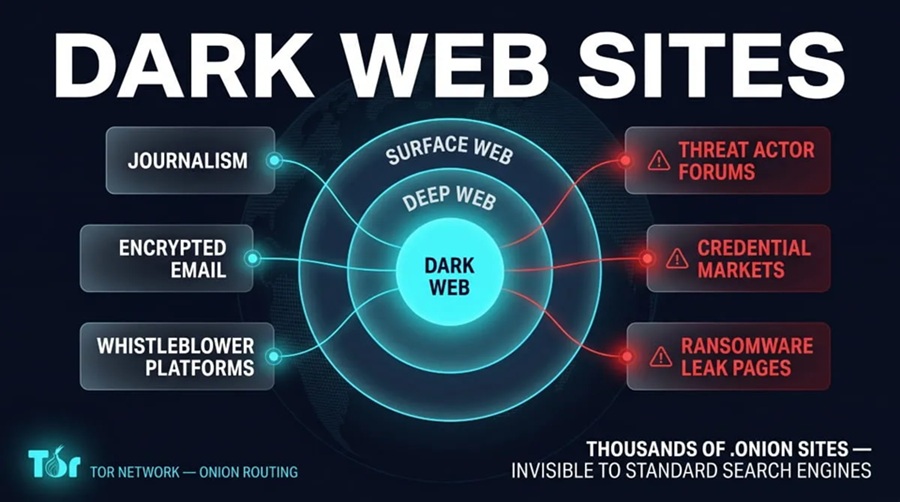
If you open Tor Browser and expect Google-style results for every .onion site, you will be disappointed. The Tor network is built for privacy, not for being fully crawled and ranked. That is why people look for Tor search engines, onion directories, and other search engines for Tor instead of relying on ordinary search alone.
This guide answers the questions most beginners actually have: How do I search the Tor network? Is Google available on Tor? What search engine works with Tor Browser? and How do I find onion websites safely?
New to Tor? Start with what Tor Browser is and how it works.
This article explains how discovery works on Tor for privacy and research. It does not promote illegal sites or activity.
What Are Tor Search Engines?
A Tor search engine (sometimes called an onion search engine or dark web search engine) is a tool meant to help you find content reachable over Tor — especially sites with .onion addresses.
Normal search engines crawl the public web, follow links, and build huge indexes. On Tor, many services avoid publicity, change addresses, or never link to each other in a crawlable way. So Tor search tools work with a smaller, messier, often incomplete map. Coverage is limited by design, not only by engineering effort.
How Do I Search the Tor Network?
In practice, people combine a few approaches:
- Use Tor Browser so you can actually open .onion addresses.
- Try specialized Tor / onion search tools that index whatever onion content they can reach.
- Use curated directories when you need categories rather than keyword search.
- Prefer known, verified addresses from trusted publishers when the goal is a specific legitimate service (news mirrors, privacy projects, etc.).
There is no single complete catalog of the Tor network. Anything that claims to list “all onion sites” is overselling.
Is Google Available on Tor?
Yes — you can open Google (and other mainstream search engines) in Tor Browser and search the normal web through a Tor exit relay.
What Google generally does not do is index the Tor network’s onion services. .onion sites are not part of the usual DNS and public linking graph those crawlers are built for. So:
- Google on Tor ≈ private-ish access to the surface web (with CAPTCHAs and blocks common on shared Tor exits)
- Tor search engines ≈ imperfect indexes of some onion content
That distinction answers most confusion about “searching the dark web with Google.”
What Search Engine Works with Tor Browser?
Tor Browser can load almost any site the Tor network can reach: mainstream search engines, privacy-oriented clearnet search (for example tools discussed in our DuckDuckGo privacy overview), and onion-based search or directory sites.
There is no official “the” Tor Browser search engine that contains every onion service. The browser gives you access; discovery still depends on indexes, directories, or addresses you already trust. Privacy-focused clearnet search is often smoother for everyday queries; specialized onion search is for when you specifically need .onion results.
Tor Browser vs Tor Search Engine
| Tool | Role |
|---|---|
| Tor Browser | Connects you to Tor and opens pages (including .onion) |
| Tor / onion search engine | Tries to index and search some onion (and sometimes related) content |
| Onion service | A site hosted on Tor with a .onion address |
For how those sites are built, see onion services explained.
How Tor Search Indexing Differs from Google
Clearnet search leans on links, reputation, and constant recrawling. Onion search has fewer of those signals: fewer public links, short-lived services, and operators who may not want to be found. Results sets are smaller, noisier, and can include dead links. Treat rankings as weak hints, not authority.
Types of Discovery Tools
General Tor search engines — Keyword search over whatever onion pages they have managed to index.
Onion directories — Human-curated lists by category (privacy tools, news, research, etc.). Useful for browsing; still can be outdated or maliciously edited.
Research-oriented tools — Used by security teams for threat intel, phishing tracking, and abuse trends — usually as one source among many, not a tourist map.
| Tor search engine | Onion directory | |
|---|---|---|
| Discovery | More automated | Often manual |
| Use | Keyword queries | Browse categories |
| Freshness | Depends on crawlers | Depends on editors |
How Do I Find Onion Websites Safely?
Safety is less about a magic search box and more about habits:
- Download Tor Browser only from official sources; keep it updated
- Prefer Safer/Safest security levels on untrusted pages
- Do not assume a .onion address is trustworthy — phishing clones are common
- Verify important addresses through multiple independent channels when possible
- Skip unknown downloads and anything asking for passwords, seed phrases, or payment up front
- Do not mix personal logins into sessions where you want anonymity
More detail: Tor Browser safety tips and the Tor Browser Safety Tips.
Why Many Onion Sites Never Appear in Search
Private groups, internal tools, and anyone avoiding scanners simply never submit to public indexes. Privacy and full discoverability pull in opposite directions. Incomplete search results are normal, not a bug in your setup.
Common Mistakes
- Trusting every search hit because “it’s on Tor”
- Following long .onion links without checking for typos or fakes
- Turning security settings down “so sites work”
- Expecting Tor search to replace Google for general knowledge
- Believing the browser alone makes every click safe
Deep Web, Dark Web, and Tor Search
Tor search is mainly about onion services (often discussed under the “dark web” label). The deep web is much larger — email, banking, anything not meant for public crawl. See surface vs deep vs dark web and dark web explained.
Frequently Asked Questions
How do I search the Tor network?
Use Tor Browser, then a combination of onion/Tor search tools, curated directories, and verified addresses from trusted sources. No tool indexes everything.
Is Google available on Tor?
Yes for searching the regular web through Tor. No for comprehensively indexing .onion services.
What search engine works with Tor Browser?
Any site Tor can reach — mainstream search, privacy-oriented clearnet search, and specialized onion search or directories. Pick based on whether you need clearnet results or onion discovery.
How do I find onion websites safely?
Official Tor Browser, careful security levels, skepticism toward unknown links, no sensitive logins or downloads from random hits, and verification of important addresses.
Do Tor search engines show every onion site?
No. Many services are private, temporary, or deliberately unlisted.
Is using a Tor search engine illegal?
Using privacy tools and search for legitimate research or browsing is legal in most places. Illegal activity remains illegal regardless of the network.
Conclusion
Tor search engines exist because the Tor network does not work like the Google-indexed web. How to search the Tor network means accepting incomplete indexes, combining search tools with directories and verified links, and keeping safety habits tight. Google can run in Tor Browser for the surface web; it is not a full dark web search engine. Onion search engines and directories help — carefully — when you need .onion discovery.
More on Tor, onion services, and privacy tools is on Torzle.